Skip to content

创建Plugin

  • 需要创建一个Visual Studio Project,plugin需要实现Microsoft.Xrm.Sdk.IPlugin接口
  • IPlugin中仅有一个Execute方法,从IServiceProvider中可以获取到 plug-in execution context (IPluginExecutionContext), tracing service (ITracingService), organization service (IOrganizationServiceFactory), and notification service (IServiceEndpointNotificationService)
namespace Microsoft.Xrm.Sdk
{
    public interface IPlugin
    {
        //
        // Summary:
        //     Executes plug-in code in response to an event.
        //
        // Parameters:
        //   serviceProvider:
        //     Type: IService_Provider. A container for service objects. Contains references
        //     to the plug-in execution context (Microsoft.Xrm.Sdk.IPluginExecutionContext),
        //     tracing service (Microsoft.Xrm.Sdk.ITracingService), organization service (Microsoft.Xrm.Sdk.IOrganizationServiceFactory),
        //     and notification service (Microsoft.Xrm.Sdk.IServiceEndpointNotificationService).
        void Execute(IServiceProvider serviceProvider);
    }
}

namespace System
{
    public interface IServiceProvider
    {
        //
        // Summary:
        //     Gets the service object of the specified type.
        //
        // Parameters:
        //   serviceType:
        //     An object that specifies the type of service object to get.
        //
        // Returns:
        //     A service object of type serviceType. -or- null if there is no service object
        //     of type serviceType.
        object GetService(Type serviceType);
    }
}
  • 插件可以修改IPluginExecutionContext中的值。
  • IServiceEndpointNotificationService只提供一个功能,将当前entity发送到azure service bus。需要先注册Service Endpoint
  • 使用context.InputParameters。它有哪些key呢?比如当前request message是CreateRequest,那么CreateRequest下的所有property都可以从context.InputParameters中读取(最重要的是Entity属性)。但类型需要手动cast,比如DeleteRequest的Entity的类型是EntityReference。可以Entity内部的数据。
  • 使用context.OutputParameters。它有哪些key呢?当前response message中的所有property都可以从context.OutputParameters中读取。
  • pre and post images。仅sync post-event和async plugins可以获得PostEntityImages。create消息没有pre-images,删除没有post-images。
  • 对于sync类型的plugin,可以抛出自定义异常,会显示在UI上。InvalidPluginExecutionException,修改它的Message字段。
  • 对于async类型的plugin,每次执行都创建一个system job。
  • plugin间可以传递数据,只需把kvpair保存在context.SharedVariables中即可。
  • 扮演其他用户(impersonate)。在register step时,可以指定以哪个用户执行;运行时也可以修改。在IPluginExecutionContext中有InitiatingUserId,它是当前请求的触发者,而UserId是要扮演某个人。比如张三创建了记录,但plugin以admin权限执行,InitiatingUserId是张三,UserId是admin。
  • 推荐将plugin注册到database中,注册到database中会自动在多个server间分发。on-disk方便调试。Power Platform,仅支持保存到database中。

PluginClass的constructor

  • PluginClass可以有constructor
public SamplePlugin()
public SamplePlugin(string unsecure)
public SamplePlugin(string unsecure, string secure) //这两个参数,是在Register New Step中配置的。

plugin的运行环境

  • plugin和workflow activity默认都是在sandbox中执行的,可以访问organization service,但不可以访问filesystem、不可以访问registry、有受限的network功能。
  • D365会监控plugin执行,如果超过了CPU阈值,或memory阈值,会自动被kill掉。被kill的不是一个request,而是一个进程(可能有多个requests)

签名

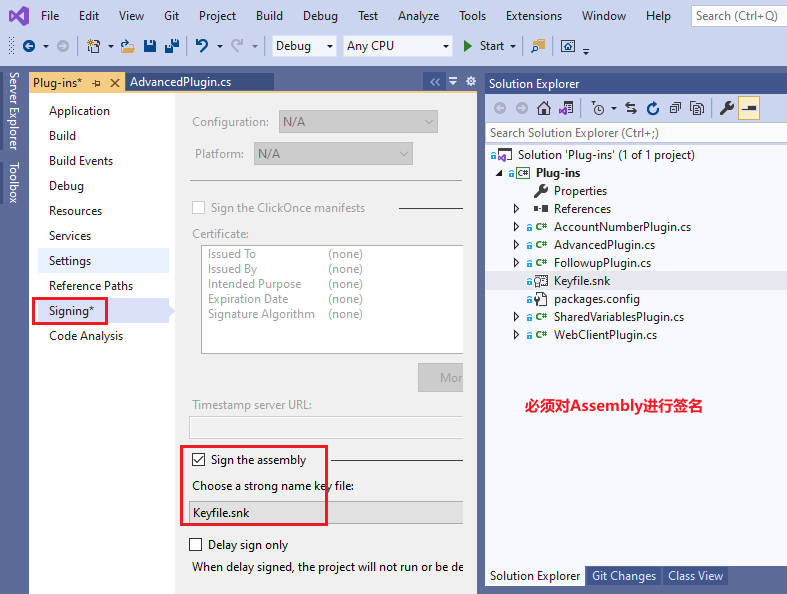
  • 必须对plugin assembly进行签名。可以用VS中的Signing,或sn.exe(Strong Name tool)

示例代码

  • https://github.com/microsoft/PowerApps-Samples/tree/master/cds/orgsvc/C%23/FollowupPlugin

配置plugin

  • 如何使用PluginRegistrationTool见单独的章节。
  • plugin的所有配置都是通过 PluginRegistrationTool,可以register、unregister、update、disable、enable